
Presentations: Filter a Presentation by Catalog
1778684104385
Here are the latest updates to the DSR app.
HIGHLIGHTS OF THE RELEASE
Filter a Presentation by Catalog
You can now narrow a presentation down to only the catalogs you want to show, without changing the underlying segment. A new Catalogs section appears in the Edit Presentation modal, right below Hide assortments, following the same collapsible pattern with a selected-count badge and a checkbox list.
Only root catalogs are listed. Related Catalogs and Sub-catalogs are included automatically.
Multiple selections are supported.
An empty selection means "no catalogs" are shown, not "all".
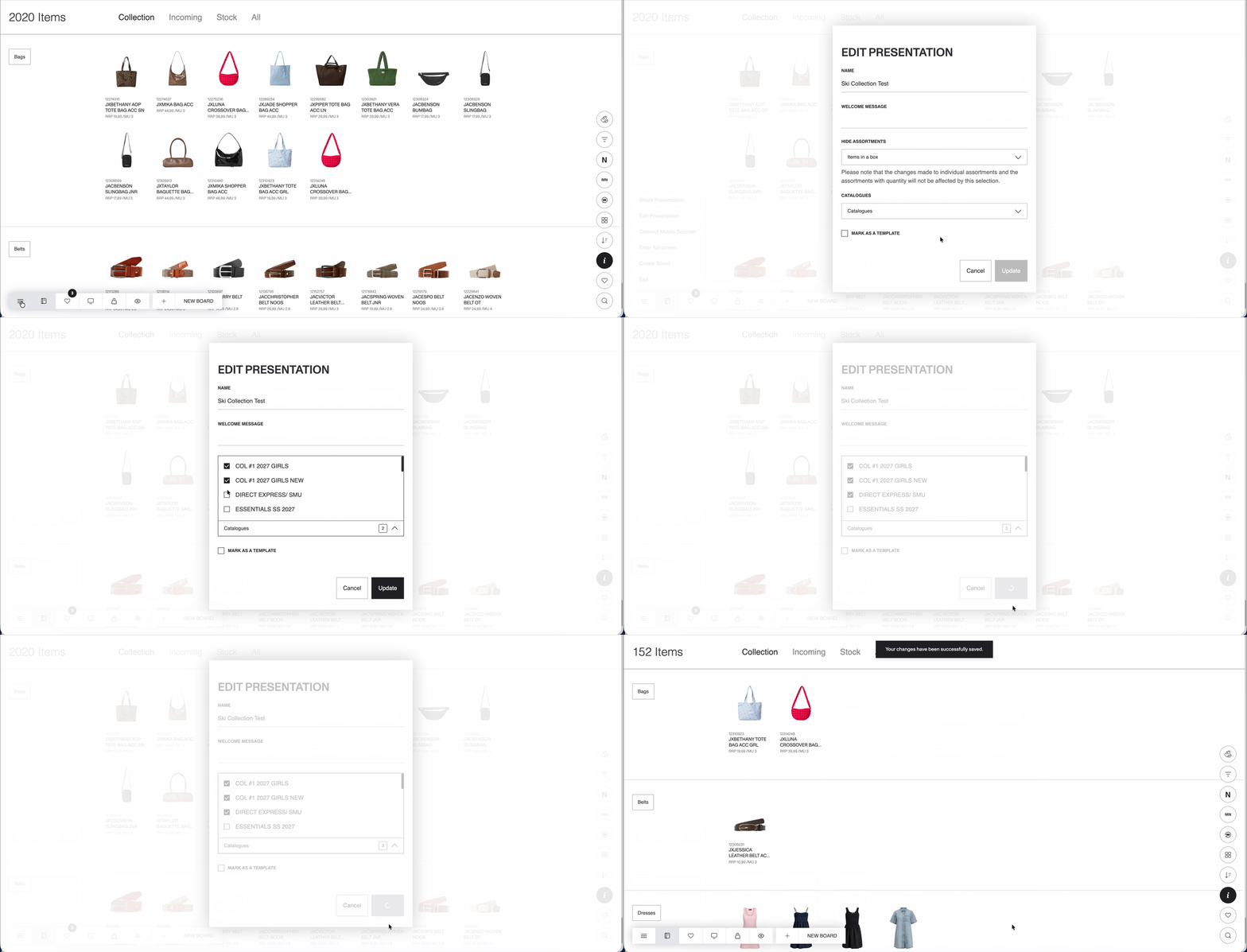
Once saved, all listings in the presentation update to reflect the filter across Catalog, Color Variants, Favorites, Basket, Merch Floor, Boards, and Moodboards, with no manual refresh needed.
FIXES & REFINEMENTS
Free Assortment Items with Collection Stock Type
Free Assortment items with the Collection stock type now appear correctly under the Stock tab on PDP.
Inactive Styles with Data Now Displayed
Inactive styles that have data are now displayed in Moodboards.
Color Swatch Fallback in Inbound
Previously when viewing the Inbound section of the PDP, color variants with no media area appeared empty or broken. Now it displays a color swatch as a fallback, consistent with existing behavior in Catalog and Basket.
